




The modern workplace is no longer limited to a single office. Companies now have employees working from offices, homes, coworking spaces, client locations and different cities. Hybrid and remote work have made it possible for organizations to build distributed teams, but they have also created new challenges for IT departments.
Managing 20 laptops in one office is relatively simple. Managing 500 or 1,000 corporate devices used across multiple cities is a very different task.
Companies need a structured approach to corporate device management, covering procurement, deployment, security, tracking, maintenance, replacement and employee offboarding.
For businesses with distributed teams, having the right IT infrastructure strategy can help maintain productivity while reducing hardware-related problems.
The first step is to create a clear process for managing corporate devices regardless of where employees work.
Every laptop, desktop, workstation or other company-owned device should be part of a centralized asset management system.
The IT team should be able to identify:
Centralized records become increasingly important as companies expand their remote workforce.
Without proper tracking, organizations can lose visibility over devices and may end up purchasing replacement hardware unnecessarily.
Distributed teams can create another problem: employees may end up using completely different hardware configurations.
Standardizing devices can make IT support easier.
For example, companies can create predefined configurations for:
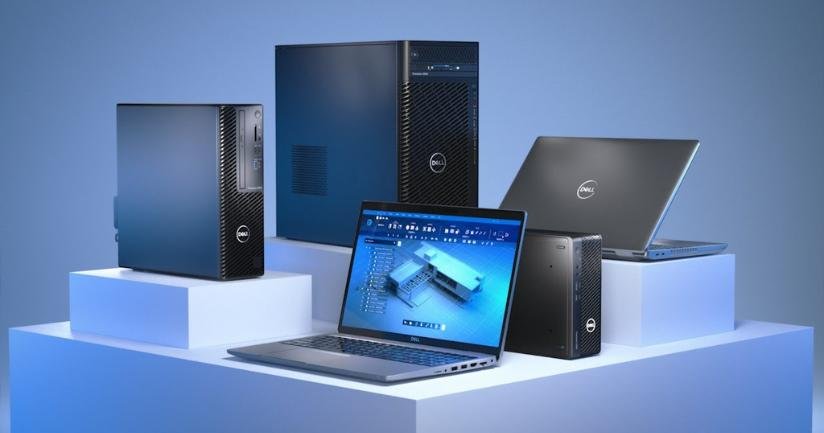
Standard employees: Business laptop with standard RAM and storage.
Developers: Higher-performance laptop with additional memory and processing power.
Designers: Dedicated graphics or workstation-class systems.
Data and AI teams: GPU-enabled workstations or high-performance computing systems.
Executives: Premium business laptops or MacBooks.
Standardization simplifies software deployment, troubleshooting, replacement and employee onboarding.
Remote employees cannot always visit the company office to collect their devices.
Therefore, laptops should ideally be prepared before they are shipped or delivered.
The deployment process may include:
A pre-configured device can allow an employee to begin working with minimal assistance.
This becomes especially valuable when companies are onboarding dozens of remote employees simultaneously.
A distributed workforce may have employees in Delhi, Bengaluru, Hyderabad, Mumbai, Pune, Gurugram, Chennai and other locations.
The IT team needs visibility across all these locations.
Companies should maintain an up-to-date record of where every device is assigned.
For larger organizations, asset tracking should be integrated into the employee lifecycle.
When an employee joins, a device is assigned.
When the employee changes location, the asset record is updated.
When the employee leaves, the device is recovered and returned.
This creates a continuous chain of accountability.
Remote onboarding should include IT equipment planning from the beginning.
HR teams should provide IT departments with joining information early enough to prepare devices.
A simple process can be:
For companies hiring 50, 100 or more employees at a time, this process can prevent last-minute device shortages.
Businesses requiring bulk deployments can explore Rental Plaza’s enterprise IT solutions for scalable laptop, desktop, workstation, server and other equipment requirements.
Remote employees can experience hardware problems just like office employees.
The difference is that a remote employee may not have access to an internal IT desk.
Companies should therefore have a defined replacement process.
For example, if an employee’s laptop develops a serious hardware issue, the organization should know:
A structured replacement process can reduce employee downtime.
One of the most effective ways to reduce downtime is maintaining an appropriate spare-device strategy.
Companies do not necessarily need spare laptops for every employee. However, they should have access to replacement devices based on workforce size, device failure rates and business requirements.
For example, a company with 500 employees spread across several cities may maintain a defined pool of replacement systems or use a flexible deployment partner when additional equipment is required.
This approach provides IT teams with greater flexibility during unexpected hardware failures or sudden hiring.
Remote devices operate outside the company’s traditional network environment.
Employees may connect from home networks, coworking spaces, hotels, airports or client locations.
This increases the importance of endpoint security.
Companies should consider appropriate security measures such as:
Security requirements should be included in the device deployment process rather than added later.
Device management does not end when an employee leaves the company.
Offboarding is one of the most important stages of the corporate device lifecycle.
The company should have a process for:
Remote employees can make equipment recovery more complicated because devices may be located hundreds of kilometres away from the main office.
A defined recovery process can reduce asset losses and improve accountability.
As organizations expand, IT teams may struggle to provide physical support to employees in different cities.
A company operating across India may need equipment delivered or replaced in several locations at the same time.
This is where a centralized enterprise IT deployment partner can be useful.
Rental Plaza supports PAN India IT equipment deployment for businesses that need laptops, MacBooks, desktops, workstations, servers and other technology across different locations.
Centralized coordination can help organizations maintain consistent equipment standards while supporting employees in multiple cities.
Distributed organizations often rely on contractors, consultants and project-based employees.
These workers may only need company equipment for a few weeks or months.
Purchasing permanent hardware for every temporary employee can result in unnecessary inventory.
Flexible equipment deployment can be useful in these situations.
Companies can provide appropriate laptops or workstations for the project duration and adjust their requirements when the workforce changes.
This approach can be particularly valuable for consulting projects, training programs, temporary teams and short-term corporate assignments.
Large remote workforces require clear support processes.
IT departments should establish expectations around response times, troubleshooting, replacements and escalation.
For larger organizations, an enterprise support SLA can help define service expectations and responsibilities.
This becomes increasingly important when employee productivity depends on access to a functioning device.
Corporate device management should cover the entire lifecycle of a device.
A typical lifecycle includes:
Procurement → Configuration → Deployment → Assignment → Monitoring → Maintenance → Replacement → Recovery → Reassignment or Retirement
Managing the complete lifecycle gives IT teams better visibility into their hardware inventory.
It can also help companies identify devices that are underused, outdated or approaching replacement.
A company may begin with 20 remote employees and eventually grow to 500 or 1,000 distributed workers.
The device management process should therefore be designed for growth.
Manual spreadsheets and informal processes may work at a small scale but become difficult to maintain as device numbers increase.
Companies should gradually introduce standardized processes, asset tracking, centralized deployment and clear support procedures.
Managing corporate devices when employees work from anywhere requires more than simply providing laptops.
Organizations need a complete strategy covering device selection, standardization, configuration, delivery, asset tracking, security, support, replacement, employee offboarding and lifecycle management.
A well-planned device strategy can help businesses maintain productivity even when employees are spread across different cities and locations.
For companies with distributed teams, rapid hiring requirements or multi-city operations, flexible access to enterprise IT equipment can provide additional scalability.
Rental Plaza supports businesses with laptops, MacBooks, desktops, workstations, servers, GPUs and other IT equipment for corporate deployments across India.
Whether a company is managing a small remote team or hundreds of employees across multiple cities, a structured device lifecycle strategy can help IT teams maintain control, reduce downtime and ensure employees have the technology they need to work productively from anywhere.